
 Stephanie Ruozzo
Here at ONE LICENSE, we know licensing needs can change over time. As new technologies become standard, your congregation may begin to use music in new ways, and our goal is to help you do just that!
Our Recorded Audio License gives church leaders and musicians permission to use audio recordings in ways that can help their congregations grow musically. This license covers usage of ONE LICENSE titles for rehearsal purposes as well as during worship services.
TYPES OF RECORDINGS COVERED BY THE RECORDED AUDIO LICENSE
Recorded Audio usage features two types of recordings: Commercial and Non-Commercial.
Commercial Recordings are approved professional recordings created by the Member Publisher. You can purchase commercial recordings from the publisher directly or access them through the Member Publisher’s streaming channels (YouTube, Spotify, etc.). You can find contact information for our Member Publishers on the ONE LICENSE website.
Non-Commercial Recordings are self-made recordings of approved copyrighted songs from ONE LICENSE Member Publishers. These self-made recordings might feature the entire work, the accompaniment only, individual vocal or instrumental parts, or specific portions of the piece.
Please note that the Recorded Audio License does not allow License Holders to create new arrangements of copyrighted titles or alter the work in any way. For permission to arrange or alter a copyrighted work, contact the copyright holder directly.
HOW RECORDINGS CAN BE USED UNDER THE RECORDED AUDIO LICENSE
With a Recorded Audio License, you can create and distribute recordings of approved titles from our Member Publishers (whether physical media like CDs or digital files like MP3s) to your musicians, facilitating individual practice and learning. Ensemble leaders might choose to use accompaniment recordings during rehearsals so they can concentrate on listening to and coaching ensemble members.
The Recorded Audio License also allows you to download, store, or embed recordings of approved ONE LICENSE titles for use during worship services. For example, License Holders can embed recordings in slideshow presentations so the audio recording and reprint display are synchronized. Utilizing accompaniment tracks during worship services may also provide a helpful option for music directors who struggle to accompany and direct the choir on difficult pieces. To include recordings in online worship services, you will also need a Podcast / Streaming License.
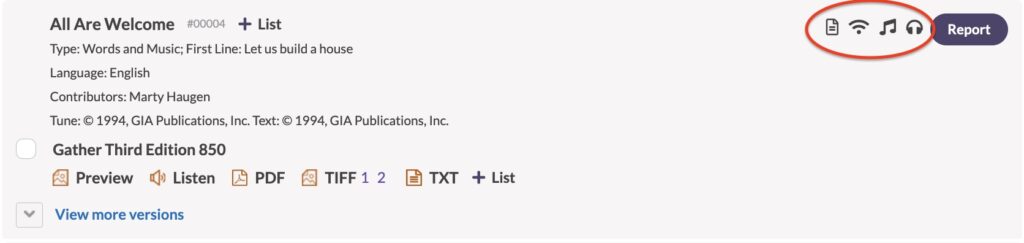
Remember that Member Publishers maintain full control over their titles, and they decide which titles to approve for which type(s) of use. The Permissions Icons on each database record (circled in red below) indicate which usage type(s) the Member Publisher has approved. Before purchasing a Recorded Audio License, we recommend checking the ONE LICENSE database to ensure the title(s) you want to use are approved for the type of use you have in mind. You can find more information about approved permissions in this helpful resource: Permissions Icons
REPORTING RECORDED AUDIO USAGE
- Click on the purple “Report Usage” button in the upper right corner of your screen and search for the songs you’d like to report.
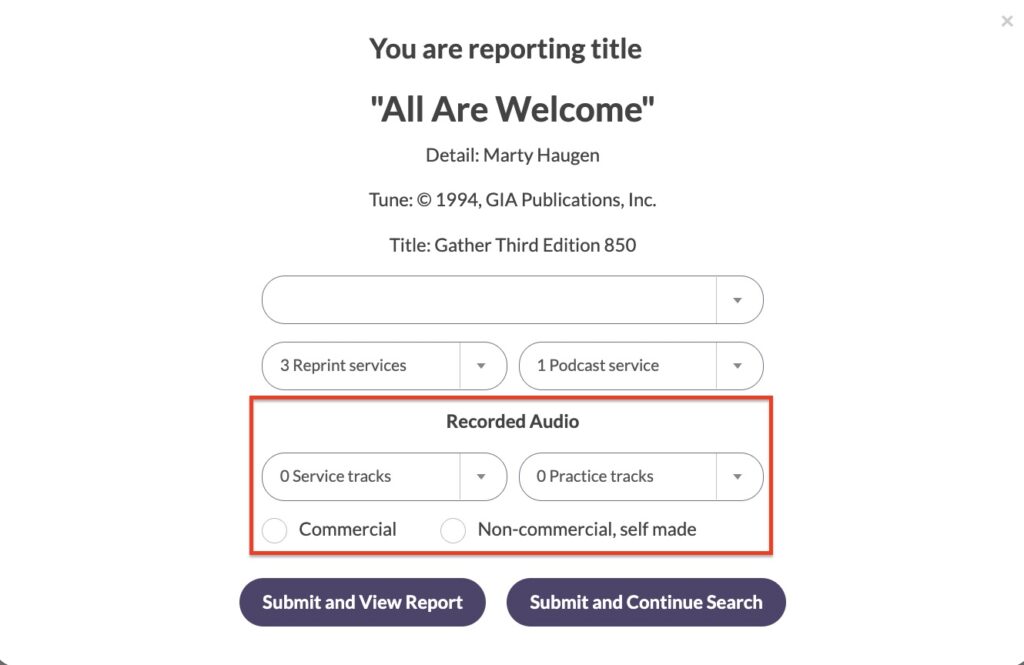
- In the pop-up reporting window, select the number of Service tracks and/or Practice tracks, and then select Commercial or Non-Commercial.
- When reporting the number of service tracks, select the number of services at which the recordings were used.
- When reporting rehearsal tracks, select the number of tracks that were created. For example, if you shared one rehearsal track with your musicians, you would report one rehearsal track use. If you distributed separate tracks for the soprano, alto, tenor, and bass sections, you would report four rehearsal track uses.
To learn more about the most efficient ways to search our database, take a look at our How To Search blog.
If you wish to use recordings created by a third party (for example, a YouTube lyric video created by another church or individual), you will need to secure permission from the recording’s owner(s) in addition to the permissions allowed under our Recorded Audio License.
If the recording’s owner gives you permission, and the Member Publisher has approved the title for non-commercial use, you can then report Non-Commercial Recorded Audio use as described above. For additional details, take a look at our blog, Using Other People’s YouTube Videos.
We know there is a lot to think through when using music in new ways, and we are always happy to provide information that may be helpful as you consider your organization’s licensing needs! Please send an email to info@onelicense.net any time questions arise.
Photo by Nikita Korchagin: https://www.pexels.com/photo/close-up-shot-of-audio-reels-10899731/.